
Out of nowhere, Apple released iOS 26.5 Public Beta 1 – available now for folks enrolled in the open testing group. For those hoping minor tweaks arrive without big visual shifts, this version fits the moment well. Though nothing screams revolution, small fixes appear where they matter.
Not like those big once-a-year updates full of glitzy features, iOS 26.5 spends time cleaning up the stuff you touch daily. Smarter route hints pop up now in Maps, and texts heading to Android devices get tighter security. Some small fixes appear only in certain places. Everything that matters fits right here, spelled out plain.
Table of Contents
What’s New in iOS 26.5 Public Beta 1?
This iOS 26.5 Public Beta 1 update keeps things practical. Apple skipped big AI or Siri upgrades, likely saving those for iOS 27 later this year. Instead, the changes feel thoughtful and aimed at making daily tasks smoother.
Key highlights include:
- A new “Suggested Places” feature in Apple Maps
- End-to-end encryption testing for RCS messages
- Groundwork for ads in Maps (coming later this summer)
- Easier pairing for certain accessories (especially in Europe)
- Various bug fixes and small performance improvements
Smarter Discovery with Suggested Places in Apple Maps
Start typing in Apple Maps after opening it, then look up at the search area – there’s a row labeled Suggested Places that pops in instantly. This strip adjusts itself based on local trends and things you’ve looked up lately, because context helps shape what appears. Your past activity is included alongside Apple’s live signals. That it thinks matters.
Imagine getting tips from someone who knows what you need. A casual bite? Nearby favorites may show up. Off for a weekend escape? Hotspots like parks or stores might appear nearby.
Exploring places doesn’t seem forced now. Instead of needing precise names, suggestions pop up drawn from live patterns plus personal routines. Some who tried it first noticed how smoothly it fits their thoughts – less robotic than old searches ever were.
Summer brings a change. Ads are coming to Apple Maps, popping up when you search – maybe even in Suggested Places too. Each ad gets marked, so you know what it is. Your map activity stays with you. Apple promises not to share that information with anyone else.
Better Privacy for Messages Between iPhone and Android
What stands out now? End-to-end encryption is back for RCS messages. When texting Android users, that upgrade swapped out outdated SMS for something smarter – RCS makes it happen.
One step forward, one step back – that’s how it felt when Apple shelved the encryption feature after early test versions. This time around, version 26.5 brings it live without asking first, though you can still switch it off under Settings > Messages > RCS. Protection levels rise quietly once enabled, matching the shield iPhone users already get inside iMessage threads. Not magic, just math working harder behind everyday texts.
A small padlock appears next to messages that are locked down tight, showing only you and the friend you chat with can view what’s sent – texts, images, anything. Security like this changes how safe it feels to message across different apps, particularly when swapping things like home addresses or vacation snapshots.
A few carriers and devices might not support it just now – though testing continues. This move clearly narrows the privacy divide between Android and iPhone.
iOS 26.5 Public Beta 1: Other Notable Changes and Regional Tests
- Easier accessory pairing: Apple is testing better support for third-party wearables and accessories in the European Union. It includes Live Activities compatibility and simpler connection methods (such as plugging in a Magic Keyboard or Trackpad via USB-C to auto-pair via Bluetooth). These changes seem tied to local regulations that push for greater openness.
- Small polish: Users report minor UI tweaks, such as improved animations and fixes for crashes, Wi-Fi stability, and battery drain in some apps. Nothing revolutionary, but these quiet improvements often make the phone feel more reliable day to day.
No major new Apple Intelligence or Siri features appear here, which matches what many expected. Apple seems focused on stability now and bigger announcements at WWDC 2026.
Who Can Install iOS 26.5 Public Beta 1?
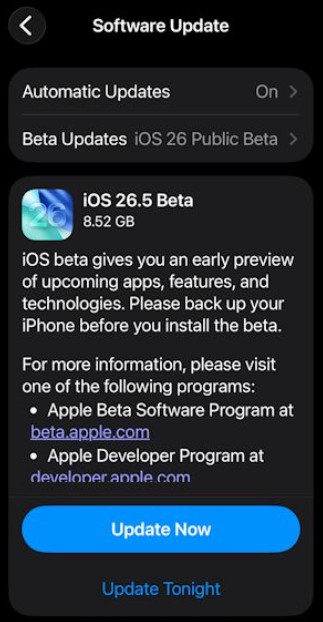
The public beta is available to anyone who joins Apple’s free Beta Software Program. Supported devices start from the iPhone 11 and newer models.
How to install it safely:
- Go to Settings → General → Software Update on your iPhone.
- If the beta shows up, tap to download and install.
Important tip: Betas can have bugs, so back up your iPhone first and avoid installing on your main daily driver if you rely on it for work or important tasks.
Featured Snippet: Quick Summary of iOS 26.5 Public Beta 1
iOS 26.5 Public Beta 1 brings Suggested Places in Apple Maps for trending recommendations, tests end-to-end encryption for RCS messages to Android users, and prepares for future Maps ads. It also includes EU-focused improvements to accessories and general bug fixes. No major Siri or AI changes this time. The update focuses on refinement rather than big new features, making it a solid step forward for privacy and everyday usability.
Final Thoughts
One small step forward, iOS 26.5 Public Beta 1 skips the spotlight tricks. Behind the scenes, though, it sharpens how your phone helps you find nearby spots worth visiting. Messages feel a bit safer now when reaching Android users, too, adding an extra layer of privacy to each exchange without making a fuss about it.
Trying out unfinished apps early? The public beta could catch your eye. Most people will find it better to wait for the finished version.
Maybe you’ve already given the beta a go – what’s your take so far? If something stood out while setting it up, toss those notes down below. Curious minds want to know. When little details jump out, that’s when things get real. Friends who track every iOS shift might appreciate hearing what you saw. Help them stay looped in.
Bet there’s more on the way while tests roll on – chances are the real shift shows up with iOS 27 by fall.